

Quick Summary:
Setting a campaign budget inside ChatGPT Ads Manager isn’t difficult once you understand the mechanics, but getting it right is a different story altogether. This guide walks you through exactly how budgeting works inside this new advertising platform, what numbers actually make sense for a first campaign, the mistakes that quietly drain your spend, and how to structure your budget so it grows with your results instead of guessing in the dark.
If you’ve recently gotten access to ChatGPT Ads Manager, there’s a decent chance you opened the budget field, stared at it for a solid minute, and then closed the tab to go research it properly. That’s a smart move, honestly. This is a brand-new advertising surface, it doesn’t behave exactly like Google Ads or Meta, and throwing money at it without a plan is the fastest way to burn through a test budget without learning anything useful.
Let’s fix that. This article is written specifically for advertisers, marketers, and small business owners who are staring at the campaign budget screen right now and trying to figure out what number to actually type in.
Most of the confusion around budgeting on this platform doesn’t come from the interface itself; the fields are simple enough. It comes from not knowing how the underlying system actually uses that number once you hit save. People bring habits from Google Ads or Meta straight into a channel that behaves differently under the hood, and then wonder why the results don’t match what they’re used to seeing elsewhere. Once you understand what’s actually happening behind that budget field, the number you choose stops feeling like a guess and starts feeling like a decision you can actually defend.
What Campaign Budget Actually Means Inside ChatGPT Ads Manager
Before touching any numbers, it helps to understand what “budget” even represents on this platform. Unlike traditional search ads where your budget is tied almost entirely to keyword auctions, ChatGPT Ads works around conversational intent. Your ad doesn’t just compete for a search term, it competes for relevance inside an actual back-and-forth conversation someone is having with the assistant.
That distinction matters because it changes how your money gets spent. A campaign budget on this platform isn’t just fuel for impressions; it’s fuel for learning. Every dollar spent early on is partly buying you data about which prompts, placements, and creative angles actually connect with real buyer intent. So when you’re setting your first budget, you’re not just deciding how much exposure you want, you’re deciding how much room the system has to figure out what’s working.
This is also why copying a Google Ads or Facebook Ads budget number straight over rarely works well. Those platforms have years of historical signal behind every account. ChatGPT Ads Manager, being new, needs a bit more breathing room to calibrate before it starts performing efficiently.
Daily Budget Versus Total Campaign Budget
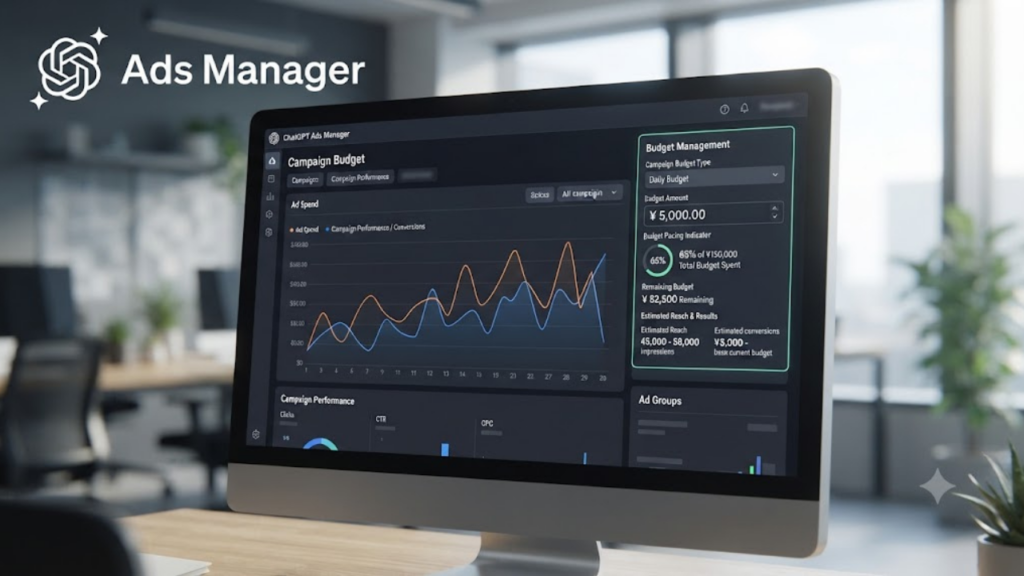
Inside the Manager, you’ll typically be asked to choose between a daily spending limit and a total budget for the entire campaign duration. This choice sounds minor, but it shapes how your campaign behaves day to day.
A daily budget caps how much can be spent in a 24-hour window, which gives you tighter control if you’re testing something new and don’t want a single unpredictable day to eat your whole month’s allocation. It’s the safer starting point for anyone who hasn’t run a campaign on this platform before.
A total campaign budget, on the other hand, lets the system distribute your spend across the entire flight of the campaign however it sees fit which can mean some days get more spend than others based on when conversational demand is highest. This approach tends to work better once you already have a few weeks of performance data and trust the system’s pacing decisions.
If this is your very first campaign, lean toward a daily budget. It’s far easier to course-correct a daily number than to watch a lump-sum budget disappear faster than expected because the platform decided one particular day had unusually strong intent signals.
How Much Should Your Starting Budget Actually Be
This is the question everyone actually wants answered, and the honest response is: it depends on your goal, your average order value, and how much risk tolerance you have for a learning phase. But since “it depends” isn’t useful on its own, here’s a grounded way to think about it.
Treat your first two to three weeks as a structured test, not a growth phase. During this window, your only job is to gather enough data to see which prompts and placements are converting. A budget that’s too small won’t generate enough signal for the system to optimize properly, and one that’s too aggressive risks burning cash before you’ve learned anything at all.
A reasonable starting point for most small and mid-sized advertisers is enough daily spend to generate at least a handful of meaningful interactions per day clicks, engagements, or conversions, depending on your objective. If your product has a longer sales cycle or higher price point, you may need a slightly larger test budget simply because your conversion signal takes longer to show up.
The mistake most new advertisers make here is going too small out of caution. A budget so tight that the system barely gets any impressions won’t teach you anything meaningful about performance; it just delays your learning curve without actually protecting your money.
Matching Budget to Campaign Objective
Your budget decision shouldn’t happen in isolation from your campaign objective. If your goal is pure visibility and getting your brand name to show up naturally when ChatGPT answers category-relevant questions your budget can be spread a bit thinner because you’re optimizing for reach and impression share rather than immediate conversions.
If your objective is lead generation or direct sales, your budget needs to be concentrated enough to actually push past the platform’s learning threshold for conversion-based optimization. Spreading a conversion-focused budget too thin is one of the more common reasons new advertisers feel like the platform “isn’t working” when really, the algorithm never had enough signal density to optimize properly.
This is where a lot of businesses get tripped up. They set a visibility-level budget but expect conversion-level results. Before locking in a number, get clear on whether you’re paying for awareness, for traffic, or for a completed action because each of those needs a meaningfully different budget floor to actually produce usable data.
How Placement Choices Change Your Budget Requirements
Not every placement inside ChatGPT Ads Manager costs the same to compete for, and this is something a lot of first-time advertisers don’t factor in until their budget is already running. Placements tied to high-intent, decision-stage conversations the moment someone is actively comparing options or asking for a specific recommendation tend to be more competitive than placements that show up earlier in a browsing or research-style conversation. That competitiveness shows up directly in how far your budget stretches.
If you’re spreading one modest budget across every placement type available, you’ll likely find that your money gets absorbed by the more competitive, high-intent slots first, leaving very little left over for the earlier-stage placements that build broader awareness. That’s not necessarily a bad outcome if conversions are your priority, but it’s worth knowing that’s what’s happening rather than being surprised by it later.
For businesses with a longer consideration cycle think higher-ticket products, B2B services, or anything people research over several days before deciding it often makes sense to run a slightly larger combined budget so you can afford a presence across multiple stages of that conversation, rather than only fighting for the most expensive, most competitive moment right before a purchase decision.
Industry and Audience Size Affect What a Reasonable Budget Looks Like
There’s no single dollar figure that works as a universal starting budget, and anyone who tells you otherwise is skipping an important detail. A local service business targeting a specific city has a fundamentally different budget reality than a national eCommerce brand or a B2B software company selling to a narrow list of decision-makers.
Smaller, local audiences generally need less daily budget to generate meaningful signal simply because there are fewer people to reach in the first place. A wider net, whether that’s a nationwide retail audience or a broad consumer product, usually needs a larger budget just to gather enough interactions across that bigger pool of potential buyers within the same testing window.
Niche B2B categories sit somewhere in a different bucket entirely. The audience might be small, but each conversion is worth considerably more, so it often makes sense to fund a smaller daily budget for a longer stretch of time rather than a larger budget for a short burst, simply because B2B buying conversations tend to unfold more slowly than consumer purchase decisions.
The point isn’t to memorize a formula, it’s to resist pulling a number from a blog post or a competitor’s case study without adjusting it for your own audience size, price point, and sales cycle. What worked for someone else’s business rarely transfers cleanly to yours.
Setting Bid Strategy Alongside Your Budget
Budget and bid strategy are two separate settings, but they work together, and setting one without thinking about the other usually leads to underwhelming results. A conservative bid paired with a tight budget often means your ads simply don’t show up often enough to matter. An aggressive bid paired with a small budget can burn through your daily cap within hours, sometimes before your target audience is even active.
If you’re prioritizing learning speed over cost efficiency in these early weeks, it often makes sense to lean slightly more aggressively on bidding while keeping your daily budget capped tight enough that a bad day doesn’t spiral. This combination gives the system enough competitive strength to actually win placements, while your budget cap acts as the safety net.
Once you’ve got two or three weeks of real data, that’s the point to start dialing bids back down and letting efficiency take priority over raw learning speed.
Budget Pacing and Why It Matters More Than the Number Itself
Here’s something a lot of new advertisers overlook entirely: the number you type into the budget field matters less than how that budget actually gets paced across the day or campaign flight. Two campaigns with identical budgets can produce very different results depending on when and how that spend gets released.
If your budget front-loads early in the day and exhausts itself before peak conversational activity for your audience, you’re leaving performance on the table even though your total spend number looks perfectly reasonable on paper. Watch your pacing reports closely in the first week. If you notice your daily budget consistently running out hours before the day ends, that’s usually a signal you’re either underfunded for the demand your ads are generating, or your bid is set aggressively enough that you’re winning placements faster than your budget can sustain.
Conversely, if you’re consistently underspending your daily allocation, that’s often a sign your bid is too conservative, your targeting is too narrow, or your creativity simply isn’t resonating strongly enough to win competitive placements.
Scaling Your Budget Without Breaking Performance
Once your test phase shows which prompts, placements, and creative angles are actually converting, the temptation is to double or triple your budget overnight. Resist that urge. Sudden, large budget jumps tend to reset a portion of the platform’s learning, since it now has to recalibrate around a very different spend level than what it optimized for previously.
A steadier approach is to increase budget in smaller increments, something in the range of twenty to thirty percent at a time and give the system a few days to stabilize before pushing further. This keeps your cost-per-result relatively consistent as you scale, rather than watching efficiency drop off a cliff because the platform is essentially relearning your account from a colder start.
This is also the stage where segmenting budget across multiple campaigns, rather than piling everything into one, starts to pay off. Running separate budgets for different objectives one for visibility, one for conversions, one for retargeting users who engaged but didn’t convert gives you far more control than one large combined budget trying to do three jobs at once.
Common Budgeting Mistakes That Quietly Waste Spend
A handful of patterns show up again and again with new advertisers on this platform, and most of them are avoidable once you know to look for them.
Setting a budget based purely on what competitors are supposedly spending is one of the most common traps. Since this channel is still maturing, reliable public benchmarks are scarce, and what works for a business in a completely different category or price point tells you almost nothing useful about your own budget needs.
Another frequent issue is treating the first week’s results as final. Early data is noisy by nature. A slow Tuesday doesn’t mean the channel isn’t working, it might just mean the sample size is too small to draw conclusions from yet. Give any budget decision at least ten to fourteen days before deciding whether it’s actually working or not.
Pausing and restarting campaigns repeatedly to “save budget” during slow periods is another habit that backfires. Every restart forces a chunk of relearning, which means your budget ends up funding recalibration instead of actual performance more often than it should.
Finally, ignoring the connection between budget and creative quality trips up plenty of advertisers. No budget size fixes creativity that doesn’t match how people actually phrase questions inside a conversational interface. Sometimes the fix isn’t a bigger number, it’s a better-written ad copy that reads like a genuinely useful answer rather than an interruption.
Tracking Whether Your Budget Is Actually Working
A budget number in isolation tells you very little. What matters is what that spend is producing cost per click, cost per lead, or cost per sale, depending on your objective. Set up your tracking before you launch, not after, so you’re not stuck guessing at attribution once the campaign is already live.
Weekly check-ins work better than daily obsessing over numbers, especially in these first few weeks. Daily fluctuations are normal and expected on a channel this new. What you’re really watching for is the trendline over ten to fourteen days. Is your cost per result trending down as the system learns, flat, or climbing? That trend, more than any single day’s number, tells you whether your current budget level is actually sustainable or needs adjusting.
Adjusting Budget Around Seasonality and Demand Shifts
Conversational demand isn’t flat across the calendar, and treating your budget as a fixed, unchanging number month after month usually leaves performance on the table during the periods that matter most. Just like search and social platforms see spikes around holidays, product launches, or industry-specific events, conversational intent inside ChatGPT follows its own version of those same patterns.
If you know a busier period is coming, a seasonal sales event, an industry conference, a launch date it’s worth temporarily raising your daily budget a few days ahead of time rather than reacting once you notice demand has already picked up. Getting there early gives the system a head start on capturing that heightened intent instead of playing catch-up after competitors have already claimed the more competitive placements.
The reverse is true as well. During predictably slower periods for your category, holding a steady budget out of habit often just means paying the same price for a smaller pool of active, high-intent conversations. Trimming the budget slightly during known slow windows and redirecting that spend toward your next busier period is usually a smarter use of the same total dollars.

Signs It’s Time to Reassess Your Budget Entirely
Even with a solid starting approach, there comes a point where the original budget number stops making sense, and recognizing that moment is its own skill. A few patterns tend to signal it’s time for a proper reassessment rather than a small tweak.
If your cost per result has been climbing steadily for more than two or three weeks despite no changes to creative or targeting, that’s rarely something a minor bid adjustment fixes on its own. It usually means the budget level you’re running no longer matches the level of competition inside your category, and a larger structural change not just a small nudge is what’s actually needed.
If you notice your best-performing campaign is consistently capped by budget rather than by demand, that’s an unmistakable signal you’re leaving results on the table. A campaign that would clearly spend more if allowed to, and is converting efficiently when it does get the chance, is exactly the kind of campaign that deserves a real reassessment of its budget ceiling, not just an incremental bump.
On the flip side, if you’ve scaled a budget several times and efficiency keeps dropping each time, that’s a sign you’ve likely outpaced the actual size of your addressable audience inside this channel for now, and it may be time to hold steady, or even pull back slightly, rather than continuing to push a number that the audience simply can’t absorb efficiently.
Bringing It All Together for Your First Campaign
If there’s one takeaway from all of this, it’s that budget setting inside ChatGPT Ads Manager isn’t a one-time decision you make and forget. It’s closer to a dial you keep adjusting as real data comes in starting conservative enough to protect your spend, generous enough to actually generate usable signals, and flexible enough to scale once you know what’s converting.
Start with a daily budget rather than a lump sum for your first campaign. Match that budget level to your actual objective instead of a generic number pulled from somewhere else. Watch pacing closely in week one, resist the urge to make dramatic jumps once things start working, and give every decision enough time at least ten to fourteen days before judging whether it’s paying off.
Suggested Reading: How to Choose the Right Objective for a ChatGPT Ad Campaign?
Conclusion
Campaign budgeting on ChatGPT Ads Manager rewards patience and structure far more than it rewards guessing or copying someone else’s number. Because this is still an emerging advertising surface, the businesses that treat their early budget as a controlled learning investment rather than a straight spend-for-results bet end up in a much stronger position once the platform, and their own campaigns, mature. Get the fundamentals right early, track the numbers that actually matter, and scale only once you’ve earned the data to justify it.
Of course, reading about budget strategy and actually managing a live campaign under real market pressure are two very different things, especially on a platform this new. If you’d rather not spend your own test budget figuring out these lessons firsthand, Complete Gurus runs dedicated ChatGPT Ads management for brands that want a tested strategy from day one instead of trial and error. Their specialists handle everything from campaign structure and conversational ad creative to budget pacing, bid strategy, and cross-channel retargeting, backed by transparent weekly reporting so you always know exactly what your spend is doing. With 13+ years of paid media experience now applied to this newer conversational ad format, Complete Gurus helps businesses skip the expensive guesswork stage and get straight to campaigns that actually convert.

Ashutosh Mishra is an AI Visibility & Performance Marketing Expert with 14+ years of experience helping businesses grow through AI Visibility (AEO/GEO), Google Ads, Meta Ads, and SEO. He partners with founders and business leaders to build data-driven growth strategies that increase visibility, improve marketing performance, and help businesses get discovered, trusted, and recommended in the age of AI.